MSX Official Guide: From Sign-Up to First Trade
Register an account, download the app, deposit, place your first trade, and buy the MSX token — all explained with official MSX images. Always sign up on the official site msx.com.
Free registration · Official channels · Rebate attribution via links on this site
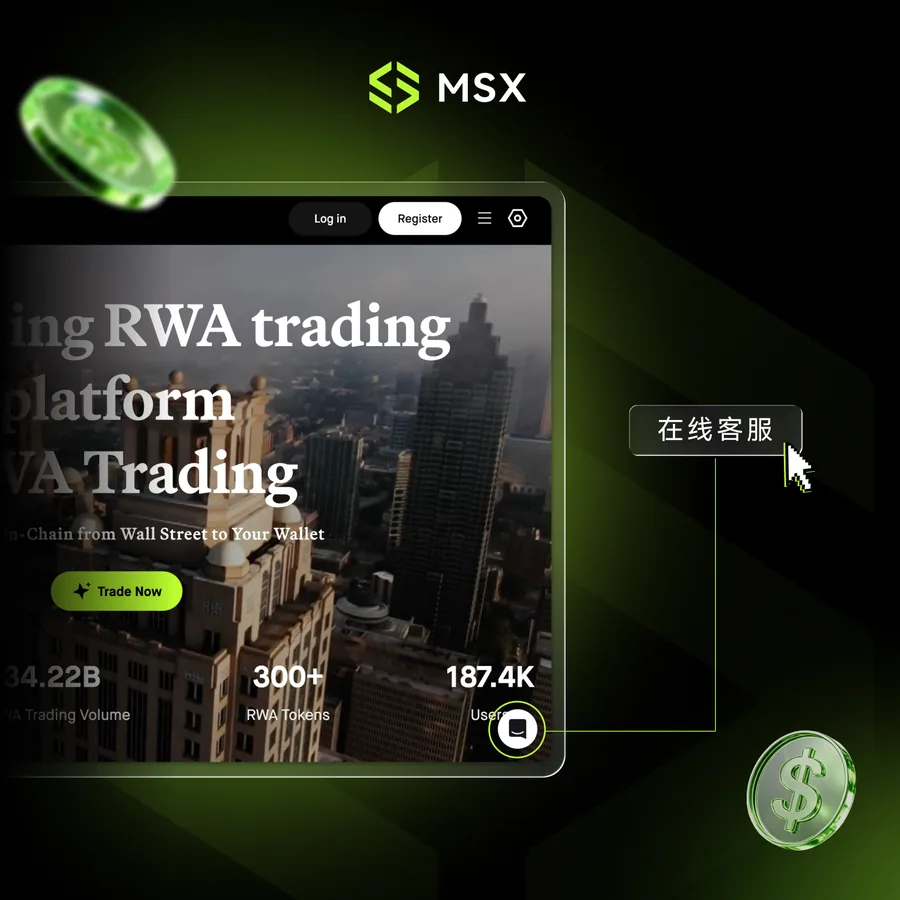
Why MSX
400+
RWA token listings, including US stock tokens
$42.72B
RWA trading volume
$120.1M
24h trading volume
MSX Benefits Center
- ✓ Trading fee discounts for holding the MSX token, with efficient yield conversion on held assets
- ✓ Dual-benefit program designed to unlock platform value
- ✓ Download the MSX whitepaper and claim your MSX
Figures shown on the official MSX website; live numbers and benefit rules are subject to msx.com.
Download the MSX App
iPhone: App Store in Singapore, Japan, South Korea, and other regions
- Open the App Store with an Apple ID signed in to a supported region
- Tap Search in the bottom-right corner and type MSX
- Find the official app "MSX: Buy Bitcoin & Crypto" by Mystonks Holding LTD. and tap Get
Note: register an overseas-region Apple ID first if you do not have one.
Android: scan the QR code on the official site
- Open msx.com in your phone browser and find the download QR code
- Scan it, follow the prompt to the store or APK download, and tap Install
⚠ Security note: if "unknown apps" installation is blocked, enable "Allow from this source" in system settings and retry.
Sign Up in Three Steps
- 1
Tap Register: open msx.com and click the Register button in the top-right corner of the homepage.
- 2
Enter your email: Gmail is recommended for reliable delivery. Binding an X Card and entering an invite code are optional. Check the spelling carefully, or you may not receive the verification email.
- 3
Create your account: click Create Account and set a password (8-16 characters, at least one lowercase letter and one number).
Note: this email is used for password recovery and important notifications, so use a long-term address.
Beginner Tutorials
1. Make Your First Trade
- After your deposit arrives, open the app home page — the top navigation includes RWA, RWA Futures, Digital Currency, and Spot Market
- Enter the RWA section and pick a stock token such as Nvidia NVDA.M
- Open the token page and tap the Trade button
- Enter your order amount (limit or market order), review the details, and confirm
2. Check Your Assets
- Tap the Assets button in the bottom-right corner of the home page after trading
- The assets page shows total estimated value, today's P&L, and account breakdown (funding / trading accounts)
- The portfolio section shows spot, futures, and Pre-IPO holdings with allocation ratios
3. Deposit Funds
Two ways in, either works:
- Method A: tap your avatar in the top-left of the app home page → My → Common Functions → Deposit
- Method B: tap the Add Funds button on the home page
- Choose USDT or USDC, select the deposit network, and complete the transfer with the address or QR code
Supported networks: USDT → SOL / ETH / BSC / Base / Tron; USDC → SOL / ETH / BSC / Base.
⚠ Always use a chain supported by the sending wallet or exchange. Depositing on the wrong network can result in loss of funds.
Deposit on MSX →4. Buy the MSX Token
- Type MSX in the search box at the top of the app home page
- Tap the Digital Currency (spot) tab in the results
- Open MSX/USDT to see the order book
- Limit order: set your price and amount. Market order: enter a USDT amount to fill at the best price
- Tap the green Buy MSX button, review the order, and confirm
- After the fill, return to Assets and find your MSX in the spot account
Tip: prefer limit orders for first-time or large purchases to reduce slippage from market swings.
Buy the MSX token →5. Need Help? Contact Support
- Tap the message icon in the top-right corner of the app home page to open Messages
- Tap "Send us a message" to chat with support directly
- The support team is online 24 hours a day
Pre-IPO Section
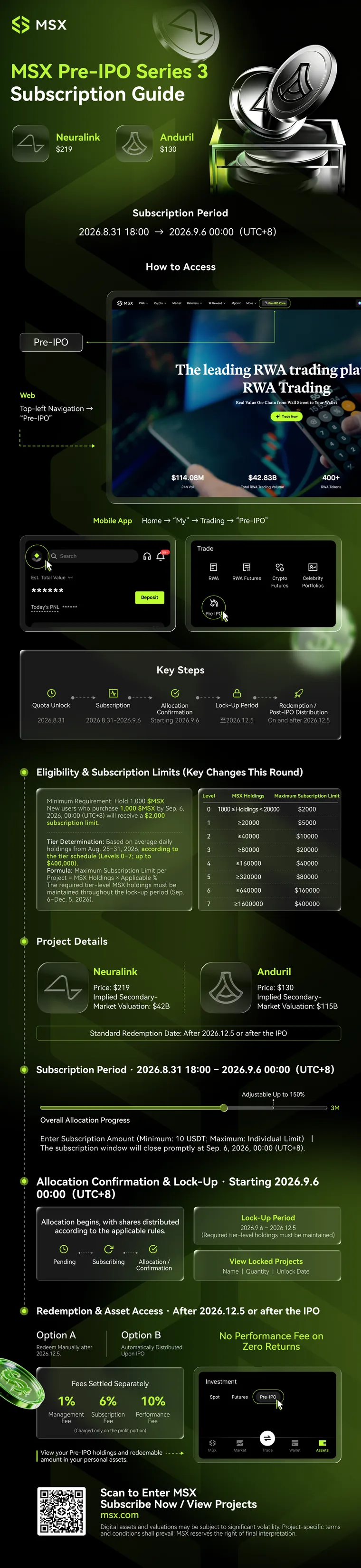
The flow below uses Series 3 (Neuralink $219 / Anduril $130, Aug 31 - Sep 6, 2026) as an example; projects, allocation, timing, and rules differ per series — always check the current series on msx.com.
Eligibility & allocation: you must hold $MSX (minimum 1,000). Allocation is tiered by average daily holdings (Level 0-7, up to $400,000), and the lock-up period requires maintaining your tier.
Access: web top-right navigation → Pre-IPO section; app My → Trading → Pre-IPO. Fees: 1% management, 6% subscription, 10% performance (charged on profit only).
View the Series 3 official poster (example)
Account Security & FAQ
How to Change Your Bound Email
- Log in to msx.com, click your avatar in the top-right corner, and open Security Center → Security Settings
- Find Email Verification and click Modify
- Verify your current email first, then enter and verify the new email
What is the official MSX website?
The official website is msx.com. Always register, download, and trade through the official site and app, and beware of lookalike domains and phishing links. Every 'Go to MSX' button on this site points to the official registration page.
How do I download the MSX app on iPhone?
Use an Apple ID signed in to an available region such as Singapore, Japan, or South Korea, open the App Store, search for MSX, and install the official app named 'MSX: Buy Bitcoin & Crypto' by Mystonks Holding LTD. If you do not have an overseas-region Apple ID, register one first.
What should I do if Android blocks the installation?
If you see 'Install unknown apps is not allowed', follow the prompt to open system settings, allow installation from this source or unknown sources, and tap the installer again. Prefer scanning the QR code on msx.com instead of downloading packages from unknown sources.
What happens if I deposit via the wrong network?
Depositing on the wrong network (chain) can result in loss of funds. USDT supports SOL, ETH, BSC, Base, and Tron; USDC supports SOL, ETH, BSC, and Base. Always pick the same chain supported by the sending wallet or exchange, and confirm with the sender before depositing.
How do I contact MSX support?
Open the MSX app, tap the message icon in the top-right corner of the home page, then tap 'Send us a message' to chat with support. The support team is online 24 hours a day.
What are the requirements for the registration email?
Use a stable email provider such as Gmail and double-check the spelling. This email is used for password recovery and important notifications, so it should be an address you keep long term.
What is an MSX Pre-IPO subscription?
The MSX Pre-IPO section offers tokenized shares of pre-IPO companies, with eligibility and allocation typically tied to your MSX platform token holdings. Projects, allocation, timing, and rules differ for each series; always check the current series page on msx.com.
Related reading: Fee Calculator · Fee Rankings · App & Region Guides
MSX Official Brand Visuals

All images are from official MSX brand assets.
Join MSX and Start RWA Trading
Free registration · Check live fees and rebates
Disclaimer: this page compiles official MSX public assets and descriptions. Interfaces, features, fees, and campaign rules may change at any time; always refer to msx.com and the in-app display. Digital asset prices and valuations can fluctuate sharply. Trading involves risk, and this page is informational only and does not constitute investment advice. MSX reserves the right of final interpretation.